Spread the love

Minecraft is one of the most creative games ever made, giving players the freedom to design, build, and personalize every detail of their virtual world. One of the most underrated yet amazing decorative elements in the game is Minecraft banners. These customizable, flag-like blocks can be used for decoration, signaling, or even storytelling in your builds.

Whether you want to give your base a unique identity, create cool patterns for your medieval castle, or simply have fun experimenting, banners are the perfect way to show off your creativity. With so many design options available, it can be overwhelming to know where to start.

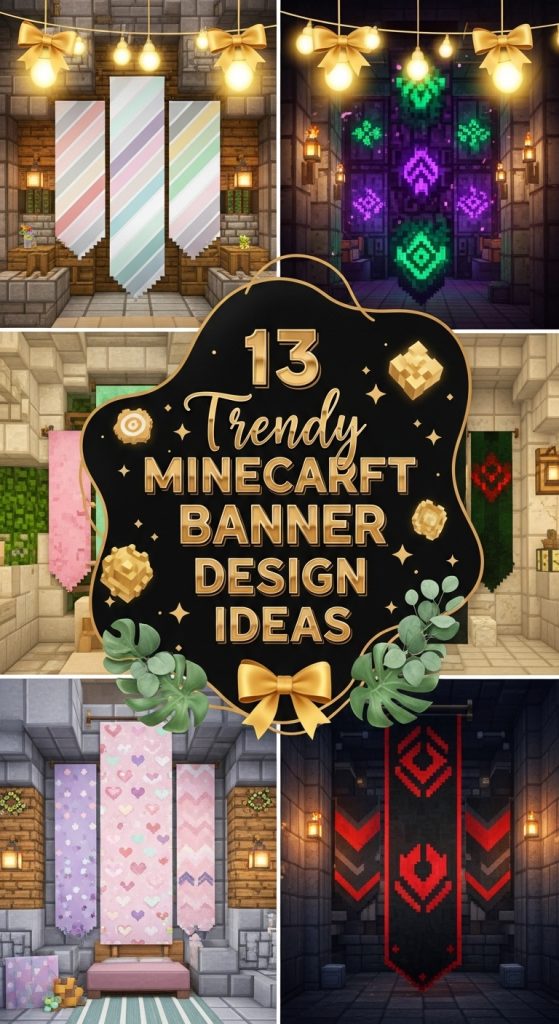
That’s why we’ve compiled trendy Minecraft banner design ideas that will inspire you to craft the perfect banner for your builds. From minimalist patterns to complex pixel art, these designs will make your Minecraft world stand out.


Why Minecraft Banners Are Awesome

Before jumping into the ideas, here’s why banners are such a powerful tool for creative players:

  • Personalization: Banners let you express yourself by adding a unique style to your base, village, or even armor.
  • Storytelling: Use banners to represent factions, kingdoms, or lore within your Minecraft world.
  • Decoration: They add texture and visual interest to any build, from castles to modern houses.
  • Utility: Attach them to shields or use them to mark paths and locations.

Pro Tip: Combine banners with other blocks like walls, fences, and item frames to create realistic flags, wall hangings, or carpets.


1. Medieval Kingdom Banner

If you’re building a castle, fortress, or medieval town, a medieval-style banner is a must-have. These designs often feature bold colors, like deep red, gold, and black, along with classic symbols such as lions, swords, or shields.

How to Design It:

  • Start with a red banner as the base.
  • Add a yellow gradient to create a regal, royal vibe.
  • Use patterns like a black cross or a golden lion emblem (crafted with creeper heads or special patterns).

Why It’s Trendy:
Medieval banners never go out of style because they’re perfect for role-playing and storytelling worlds. They instantly make your castle feel like part of a living kingdom.

Pinterest Tip:
Showcase your medieval banner on a castle gate or throne room wall to inspire other players looking for RPG-themed builds.


2. Minimalist Modern Banner

Sometimes, less is more. A minimalist banner design uses simple shapes and neutral colors to create a clean, modern aesthetic. These are perfect for modern houses or city builds in Minecraft.

How to Design It:

  • Choose a white or light gray base.
  • Add a single bold shape, like a black diagonal line or circle.
  • Stick to a monochrome or pastel palette for a sleek look.

Why It’s Trendy:
Minimalism is a huge trend in real-world design, and it translates perfectly to Minecraft builds. These banners complement modern architecture and futuristic themes.

Pinterest Tip:
Pin a mood board of minimalist Minecraft interiors with your banner design front and center for a clean, aesthetic vibe.


3. Nature-Inspired Banner

Bring the beauty of the outdoors into your Minecraft world with nature-themed banners. These designs feature elements like trees, leaves, mountains, or water patterns, making them perfect for survival bases or garden builds.

How to Design It:

  • Start with a green base.
  • Add a brown tree trunk shape and leafy details using lime or dark green dyes.
  • Experiment with a blue gradient to represent the sky or water.

Why It’s Trendy:
Nature-themed banners create a peaceful, cozy vibe, which is perfect for Pinterest aesthetics like cottagecore or outdoor retreats.

Pinterest Tip:
Display these banners near custom gardens, farms, or cozy cabins to inspire nature-loving Minecraft players.


4. Galaxy and Space Banner

For sci-fi or fantasy builds, a galaxy-themed banner adds a magical touch. These designs use deep purples, blues, and whites to mimic stars and cosmic patterns.

How to Design It:

  • Use a black or dark blue base.
  • Add white star-like dots and purple gradients.
  • Include a crescent moon or planet shape for extra flair.

Why It’s Trendy:
The galaxy aesthetic is huge on Pinterest, and a space-themed banner perfectly complements futuristic Minecraft builds or nether portals.

Pinterest Tip:
Create a sci-fi mood board featuring space banners alongside planetary builds and glowing structures.


5. Animal-Themed Banner

If you love animals or want to create a themed zoo or pet area in your Minecraft world, animal banners are a fantastic idea. From wolves to parrots, you can design banners inspired by your favorite mobs or real-world animals.

How to Design It:

  • Choose a base color that matches the animal’s main tone.
  • Add details like ears, eyes, or paw prints using layered patterns.
  • Example: A wolf banner might use gray, white, and black dyes to create a snout and eyes.

Why It’s Trendy:
Animal-themed banners are fun, cute, and perfect for survival servers with community zoos or stables.

Pinterest Tip:
Pin these designs next to pictures of real animals or Minecraft mobs for an adorable themed board.


6. Gradient Aesthetic Banner

Gradients are one of the most beautiful ways to make a Minecraft banner look professional and Pinterest-worthy. These designs blend multiple colors seamlessly, creating a smooth and artistic effect.

How to Design It:

  • Start with two to three complementary colors.
  • Use the gradient pattern in your loom to transition from dark to light shades.
  • Add a subtle overlay, like stars or geometric shapes.

Why It’s Trendy:
Gradient designs are perfect for aesthetic bases and Instagram-ready Minecraft builds. They also match well with Pinterest’s visual trends.

Pinterest Tip:
Create a tutorial pin showing how to layer dyes step-by-step to achieve the perfect gradient effect.


7. Pirate Flag Banner

Arrr, matey! If you’re building a pirate ship, coastal base, or treasure island, a pirate flag banner is a must. It’s iconic, adventurous, and a fun way to show off your inner swashbuckler.

How to Design It:

  • Use a black base to represent the classic Jolly Roger.
  • Add white skull and crossbones patterns using special banner patterns like the creeper head.
  • Incorporate red or gold accents for a unique twist.

Why It’s Trendy:
Pirate builds are extremely popular on Minecraft servers, and a custom flag helps your ship stand out.

Pinterest Tip:
Pair your banner pin with photos of pirate builds or treasure chest setups for extra engagement.


8. Cottagecore Banner

The cottagecore aesthetic is taking Pinterest by storm, and it fits perfectly in Minecraft. These banners feature soft, earthy colors and cozy symbols like mushrooms, flowers, and butterflies.

How to Design It:

  • Start with a soft cream or light brown base.
  • Add green leaves, pastel flowers, and cute details.
  • Use a soft pink or lavender gradient for a dreamy vibe.

Why It’s Trendy:
Cottagecore is all about cozy, nature-inspired living, and these banners match that aesthetic perfectly.

Pinterest Tip:
Showcase your banner with a storybook-style Minecraft cottage to inspire like-minded creators.


9. National Flags and Cultural Designs

Minecraft is played all around the world, so why not represent your country or culture with a custom flag banner? You can recreate national flags or design cultural symbols unique to your heritage.

How to Design It:

  • Use accurate colors and simple shapes to match your chosen flag.
  • Layer stripes, stars, or other symbols to create the design.
  • Example: Red, white, and blue for the United States, or green, white, and orange for India.

Why It’s Trendy:
These banners are a fantastic way to show pride in your heritage or create themed multiplayer bases.

Pinterest Tip:
Make a collage of multiple national flags to attract a global audience on Pinterest.


10. Fantasy Creature Banner

For players who love dragons, phoenixes, or mythical beasts, fantasy creature banners are a must. These designs are bold, dramatic, and perfect for role-playing servers or fantasy builds.

How to Design It:

  • Use a dark base like black or deep purple.
  • Add intricate patterns representing wings, flames, or mystical eyes.
  • Layer multiple colors to create a glowing effect.

Why It’s Trendy:
Fantasy-themed builds are hugely popular, and a unique banner can serve as a faction symbol or boss emblem.

Pinterest Tip:
Pin your fantasy banner with screenshots of epic castles or nether fortresses for a magical vibe.


Tips for Crafting the Perfect Minecraft Banner

Here are a few quick tips to help you create stunning banners:

  1. Experiment with Colors: Bold, contrasting colors make designs pop, while muted tones create a softer aesthetic.
  2. Use a Loom: The loom makes banner crafting much easier and allows for precise layering.
  3. Save Your Favorites: Keep extra copies of your favorite banners in chests for future builds.
  4. Combine with Shields: Add your banner design to a shield for extra style and utility.
  5. Follow Trends: Look at Pinterest boards and YouTube tutorials for the latest banner design trends.

Final Thoughts

Minecraft banners are more than just decorative blocks—they’re a way to express yourself, tell stories, and enhance your builds. Whether you’re designing a medieval kingdom, a modern city, or a cozy cottage, there’s a banner style to match your vision.

These trendy banner ideas are just the beginning. With endless color combinations and patterns, you can create something completely unique that represents your style. So grab your loom, gather your dyes, and start experimenting today!

If you loved these designs, don’t forget to pin this article to your Minecraft Pinterest board and share your favorite banner idea in the comments. Happy crafting!